Introducing Focus Plus: your reading, wherever you are...
By Arcaneum Focus
Category: Announcement 📢
Tags: focus plus, arcaneum focus, reading tool, pdf reader, epub reader, encrypted notes, research tools, annotation, reading library, personal archive
Most of the reading that matters to you happens in more than one place. You start a paper on your laptop, finish it on your phone, and a week later you want the passage you underlined. Somewhere in between, the trail usually goes cold.
Focus Plus is our fix for that. It’s an optional layer on top of Arcaneum Focus, our reading and research extension, and it syncs your reading, along with everything you’ve done to it, to whatever device you pick up next.
Pick up where you stopped
With Focus Plus you resume at the same document, page and position. Read on your laptop in the morning, open your tablet in the evening, and you’re back where you stopped. There’s nothing to bookmark and nothing to search for.
Most people tell us this is the feature they wanted first, and it’s the one we think about most.
One library for your reading list
Your reading list probably lives in too many places: open browser tabs, an email you sent yourself, a folder of PDFs named things like final_v2. The Focus Plus library puts it all on one shelf.
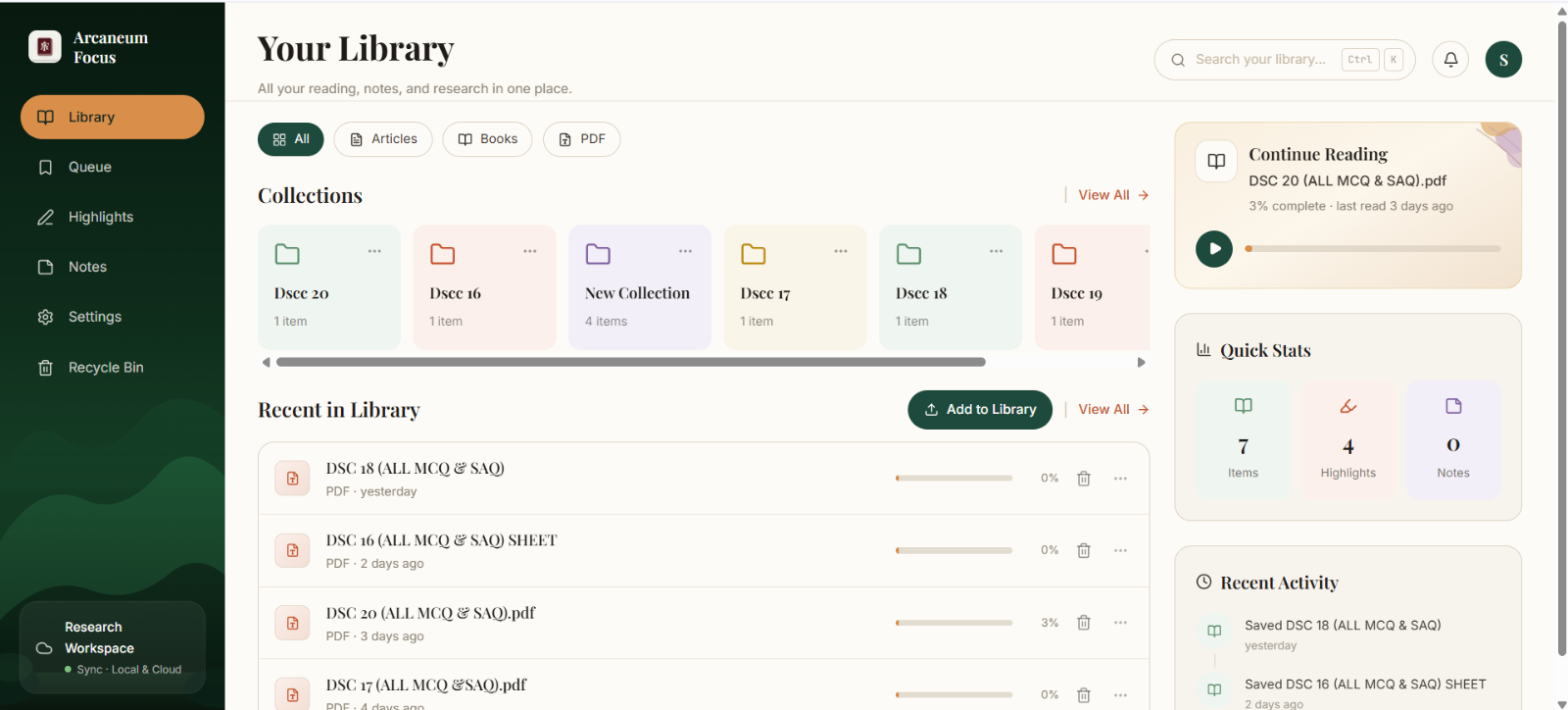
Queue articles and PDFs from anywhere on the web Upload your own PDFs and EPUBs Sort everything into collections, one for each course, paper or question you’re following Open anything from the library and return to the exact spot where you stopped
When you save an article, the library keeps the clean reader-mode copy rather than the cluttered page it came from.
A copy that survives link rot
Links break. Articles get edited, put behind a paywall or deleted, and when a university redesigns its website, a paper can vanish from the server that hosted it. If you’ve ever gone back to a source for a citation and found an error page, you know how that feels.
Whatever you read while signed in to Focus Plus, or upload yourself, becomes your own copy. The article, PDF or EPUB lives in your library, encrypted and synced, with your highlights and notes still attached. If the original disappears, your copy stays.
Web articles are saved as the clean reader-mode version: the text, the structure and your annotations, without the original layout and ads. PDFs and EPUBs are kept as the files you read.
A student keeping sources for a dissertation, or a researcher building a collection over years, ends up with an archive.
Highlights and notes on every device
Highlights and notes all sync across your devices. Annotate at your desk, review on your laptop or continue reading on your phone during the commute. The library also collects your notes and highlights in their own views. Each note appears as a tile; open it to read it in full, with its source’s name beside it and a link back to the document. Instead of being scattered across fifty files, your notes sit in one place you can survey.
Encryption and your passphrase
Your documents, highlights and notes are encrypted on your device before anything is uploaded. The encryption is AES-256, and the key comes from a passphrase only you know. We never see your content, whether that’s highlights, notes or uploads.
That has a consequence you should know about before you subscribe: if you forget your passphrase, there is no recovery. Resetting it would require us to be able to read your data, and we built Focus Plus so that we can’t. Pick a passphrase you’ll remember, or keep it in a password manager.
We think that’s the right trade for a tool people think in. A reading notebook is close to a private diary of what you’re curious about, and a company shouldn’t be able to read it.
Reading on your phone
The Focus mobile reader works in any phone or tablet browser. You can highlight, annotate, search inside a document and track your progress, and your full library is there. It’s built for reading, highlighting and notes. Some desktop tools, such as the pen tool, stay on the desktop, where they have room to work.
5 GB of storage
Every Focus Plus account includes 5 GB, enough for hundreds of PDFs and EPUBs, synced wherever you sign in. A storage meter in your library shows how much you’ve used.
What it costs
Focus Plus is a paid subscription. List prices are $4.99 per month, $24.99 for six months and $44.99 per year (nine months paid, three free). Prices are adjusted by country, so readers in lower-income regions pay less. Current details are on the Focus Plus pricing page.
What stays free
Arcaneum Focus remains completely free for students and researchers. Without an account it works as it always has: local, private, with nothing leaving your browser.
Focus Plus is for readers who want continuity across devices and a library that lasts. If that isn’t you, you lose nothing. Storage, infrastructure and time cost real money, and Plus is how we cover them while keeping Focus free for the people who need it most.
Get started
Get Focus Plus from focus.thearcaneum.org and sign in at focus.thearcaneum.org, and the extension will recognise you. If you don’t have Focus yet, it’s free in the Chrome Web Store and the Microsoft Edge Add-ons Store.
Questions, or something unclear? Write to hello@thearcaneum.org. We read everything.